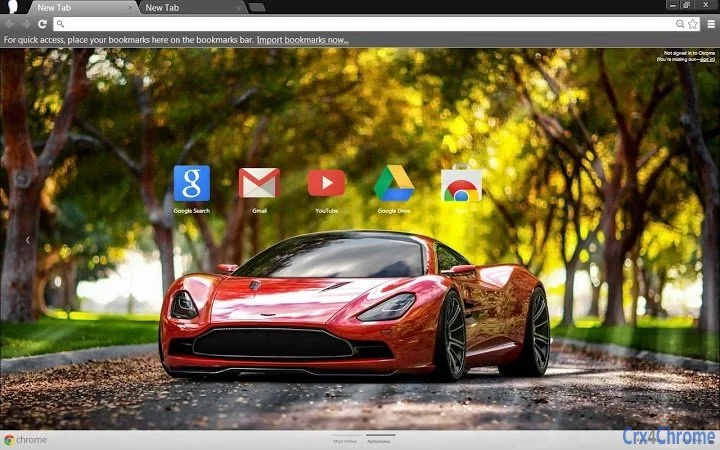

Aston Martin DBC Concept Theme for PC
This desktop theme brings the sleek design of the Aston Martin DBC Concept to your Windows and Mac systems. Designed for users who appreciate automotive elegance and high-performance aesthetics, the theme enhances visual appeal with a premium look. It is ideal for car enthusiasts, design professionals, and anyone seeking a distinctive desktop experience.
The theme supports high-resolution displays and specific aspect ratios, ensuring optimal visual clarity. Users can adjust the image scale using keyboard shortcuts for a personalized fit. The developer, AXL-G, focuses on creating immersive visual experiences through customizable themes.
Key Features & Capabilities
- High-Resolution Visual Design – The theme features a full HD image of the Aston Martin DBC Concept, optimized for displays with 16:10 and 16:9 aspect ratios and resolutions such as 1920x1200, 1920x1080, and 1680x1050.
- Customizable Image Scaling – Users can adjust the theme’s visual scale by using the Ctrl key with the + or – keys while viewing the new tab page, allowing for fine-tuned image positioning.
- Platform Compatibility – Designed to work on both Windows and Mac operating systems, offering broad accessibility for desktop users.
- Minimal System Impact – At 1.5 MB, the theme is lightweight and does not impose significant storage or performance demands on the system.
- Visual Immersion – The theme enhances the desktop environment with a high-end automotive aesthetic, appealing to fans of luxury and performance vehicles.
User Interface, Workflow & Performance
The theme is designed to integrate seamlessly into the desktop environment without altering core system functions. It operates as a visual overlay, applying the Aston Martin DBC Concept image as a background across the desktop interface. Navigation remains unchanged, with standard system interactions unaffected. Users can apply the theme through their system’s theme settings or via the provided installation method. The workflow is straightforward: install, apply, and enjoy. No additional configuration is required. Performance details were not specified by the developer. However, given the theme’s small file size and non-intrusive nature, it is expected to run efficiently on most systems. The developer did not provide additional system requirements or resource usage data.Compatibility & System Requirements
The theme is compatible with both Windows and Mac operating systems. It supports high-resolution displays with aspect ratios of 16:10 and 16:9, including common resolutions such as 1920x1200, 1920x1080, 1680x1050, and 1600x900. The installation size is 1.5 MB, which is minimal and suitable for most storage configurations. Exact system requirements were not listed. Compatibility information is limited to the supported platforms and display specifications. The developer did not specify minimum CPU, RAM, or GPU requirements.Pros and Cons
Pros
- Visually striking design inspired by a luxury sports car concept
- Optimized for high-resolution and widescreen displays
- Lightweight at just 1.5 MB
- Easy to install and apply with no complex setup
- Includes a built-in scaling feature for image fitting
Cons
- No official support for 4:3 or ultra-wide aspect ratios
- Image scaling requires manual adjustment via keyboard shortcuts
- Functionality limited to visual appearance; no interactive features
- Developer did not provide detailed system requirements
- Theme is non-interactive and purely aesthetic
Is this theme compatible with Windows and Mac?
Yes, the Aston Martin DBC Concept Theme is designed to work on both Windows and Mac operating systems.
Can I adjust the image size if it doesn’t fit my screen?
Yes, you can use the Ctrl key with the + or – keys while viewing the new tab page to zoom in or out, which adjusts the image scale for a better fit.
Is the theme free to use?
Yes, the theme is available at no cost, as indicated by the free pricing model.
Does the theme require an internet connection to work?
The theme does not require an active internet connection once installed. It functions entirely offline.
How do I install and apply the theme?
Installation typically involves downloading the file, opening it, and selecting the theme through your system’s theme or desktop customization settings. Specific steps may vary by platform.







